
Original: $57.56
-65%$57.56
$20.15The Story
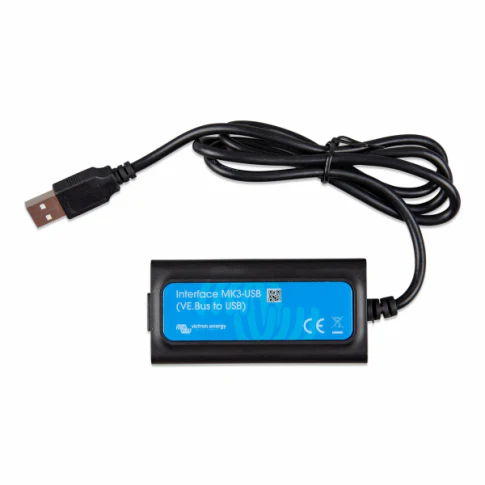
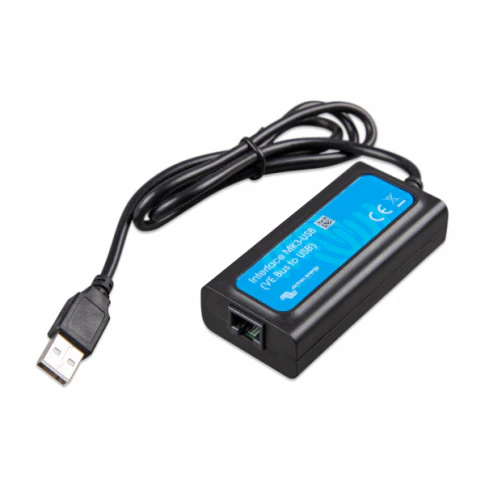
Victron VE.Direct to USB Interface Cable (ASS030530010) — Official connection cable for linking VE.Direct devices (BlueSolar & SmartSolar MPPT controllers, BMV monitors, Phoenix inverters) to a computer | Enables full monitoring, configuration & firmware updates via VictronConnect PC software | Real-time data: solar yield, battery voltage/current, charge stage, errors & history | Plug-and-play USB-A connection | 1.8 m length | No drivers required | Ideal for detailed desktop diagnostics & advanced setup of off-grid, marine, RV or solar systems | 5-year Victron warranty | EAN: 8719076019589
Connects VE.Direct port to USB-A on Windows/macOS PC. Use free VictronConnect PC software for live monitoring (solar power, battery V/A, charge state, daily kWh, errors) & configuration (absorption/float voltages, load output, equalisation). Perfect when you want in-depth desktop access instead of mobile app.
The Victron VE.Direct to USB Interface Cable (ASS030530010 / EAN 8719076019589) is the genuine, high-reliability cable for connecting Victron VE.Direct devices directly to a computer. It allows full access to detailed system data and settings through the free VictronConnect PC software (Windows & macOS), making it ideal for installers, off-grid specialists and users who prefer desktop-based configuration over mobile apps.
Simply plug the VE.Direct (RJ45-style) end into your MPPT controller (BlueSolar or SmartSolar), BMV monitor, Phoenix inverter, SmartShunt or Orion-Tr Smart, and the USB-A end into your PC. VictronConnect instantly shows real-time values: solar power output (W), battery voltage/current, charge stage (bulk/absorption/float/equalisation), daily/monthly energy totals, error codes & historical logs. Perform advanced adjustments: set absorption/float voltages, load output timer, low-voltage disconnect/reconnect, equalisation parameters & more. Update firmware directly from the software to keep your device current. No drivers or extra software needed – plug-and-play reliability from Victron.
What Makes This VE.Direct to USB Cable Special?
- Genuine Victron Interface — Official cable – ensures stable, error-free communication with all VE.Direct devices.
- VictronConnect PC Software — Free Windows/macOS tool for detailed real-time monitoring, configuration & firmware updates.
- Live System Data — Solar yield (W), battery V/A, charge stage, daily kWh totals & error codes displayed on your computer.
- Advanced Configuration — Adjust charge voltages, load timers, low-voltage disconnect & equalisation directly from PC.
- Plug-and-Play USB-A — Connects to any PC/Mac – no drivers or additional software required.
- 1.8 m Cable Length — Plenty of reach for convenient desktop or workshop use with your VE.Direct device.
- 5-Year Victron Warranty — Long-term reliability from a trusted global brand.
Key Features
Technical Specifications
| Specification | Value |
|---|---|
| MPN / SKU | ASS030530010 |
| EAN | 8719076019589 |
| Interface | VE.Direct (RJ45-style) to USB-A |
| Cable Length | 1.8 metres |
| Compatibility | All Victron VE.Direct devices: BlueSolar & SmartSolar MPPT controllers, BMV-712/710 monitors, Phoenix inverters, SmartShunt, Orion-Tr Smart |
| Software | VictronConnect PC (free – Windows & macOS) |
| Power Supply | Powered via USB (no external supply needed) |
| Operating Temperature | -20 °C to +50 °C |
| Warranty | 5 years (Victron standard) |
What's in the Box
✅ Plugs directly into VE.Direct port on MPPT controllers & USB-A port on PC/Mac – no drivers or extra power needed. Use free VictronConnect PC software for full monitoring, configuration & firmware updates. For Bluetooth/wireless access, use VE.Direct Bluetooth Smart Dongle (sold separately). 5-year Victron warranty – register online for full support. Essential for detailed desktop setup & diagnostics of BlueSolar/SmartSolar MPPT systems.
Frequently Asked Questions

Details & Craftsmanship
Every detail has been carefully considered to bring you the perfect product.

Details & Craftsmanship
Every detail has been carefully considered to bring you the perfect product.
Description
Victron VE.Direct to USB Interface Cable (ASS030530010) — Official connection cable for linking VE.Direct devices (BlueSolar & SmartSolar MPPT controllers, BMV monitors, Phoenix inverters) to a computer | Enables full monitoring, configuration & firmware updates via VictronConnect PC software | Real-time data: solar yield, battery voltage/current, charge stage, errors & history | Plug-and-play USB-A connection | 1.8 m length | No drivers required | Ideal for detailed desktop diagnostics & advanced setup of off-grid, marine, RV or solar systems | 5-year Victron warranty | EAN: 8719076019589
Connects VE.Direct port to USB-A on Windows/macOS PC. Use free VictronConnect PC software for live monitoring (solar power, battery V/A, charge state, daily kWh, errors) & configuration (absorption/float voltages, load output, equalisation). Perfect when you want in-depth desktop access instead of mobile app.
The Victron VE.Direct to USB Interface Cable (ASS030530010 / EAN 8719076019589) is the genuine, high-reliability cable for connecting Victron VE.Direct devices directly to a computer. It allows full access to detailed system data and settings through the free VictronConnect PC software (Windows & macOS), making it ideal for installers, off-grid specialists and users who prefer desktop-based configuration over mobile apps.
Simply plug the VE.Direct (RJ45-style) end into your MPPT controller (BlueSolar or SmartSolar), BMV monitor, Phoenix inverter, SmartShunt or Orion-Tr Smart, and the USB-A end into your PC. VictronConnect instantly shows real-time values: solar power output (W), battery voltage/current, charge stage (bulk/absorption/float/equalisation), daily/monthly energy totals, error codes & historical logs. Perform advanced adjustments: set absorption/float voltages, load output timer, low-voltage disconnect/reconnect, equalisation parameters & more. Update firmware directly from the software to keep your device current. No drivers or extra software needed – plug-and-play reliability from Victron.
What Makes This VE.Direct to USB Cable Special?
- Genuine Victron Interface — Official cable – ensures stable, error-free communication with all VE.Direct devices.
- VictronConnect PC Software — Free Windows/macOS tool for detailed real-time monitoring, configuration & firmware updates.
- Live System Data — Solar yield (W), battery V/A, charge stage, daily kWh totals & error codes displayed on your computer.
- Advanced Configuration — Adjust charge voltages, load timers, low-voltage disconnect & equalisation directly from PC.
- Plug-and-Play USB-A — Connects to any PC/Mac – no drivers or additional software required.
- 1.8 m Cable Length — Plenty of reach for convenient desktop or workshop use with your VE.Direct device.
- 5-Year Victron Warranty — Long-term reliability from a trusted global brand.
Key Features
Technical Specifications
| Specification | Value |
|---|---|
| MPN / SKU | ASS030530010 |
| EAN | 8719076019589 |
| Interface | VE.Direct (RJ45-style) to USB-A |
| Cable Length | 1.8 metres |
| Compatibility | All Victron VE.Direct devices: BlueSolar & SmartSolar MPPT controllers, BMV-712/710 monitors, Phoenix inverters, SmartShunt, Orion-Tr Smart |
| Software | VictronConnect PC (free – Windows & macOS) |
| Power Supply | Powered via USB (no external supply needed) |
| Operating Temperature | -20 °C to +50 °C |
| Warranty | 5 years (Victron standard) |
What's in the Box
✅ Plugs directly into VE.Direct port on MPPT controllers & USB-A port on PC/Mac – no drivers or extra power needed. Use free VictronConnect PC software for full monitoring, configuration & firmware updates. For Bluetooth/wireless access, use VE.Direct Bluetooth Smart Dongle (sold separately). 5-year Victron warranty – register online for full support. Essential for detailed desktop setup & diagnostics of BlueSolar/SmartSolar MPPT systems.